Fit a Strategy into Your Daily Routine
What this helps you do
This guide shows you how to use subscribed strategies and strategy alerts as part of a simple daily routine. It matters because a clear rhythm helps you avoid alert overload, focus on the trades that match your plan, and turn backtested ideas into decisions you can actually act on.
Start with a focused subscription list
Before thinking about routine, make sure your inputs are clean.
Open the Strategies area and switch to Subscriptions. Review the list and unsubscribe from any strategies you are no longer interested in, or that you know you will not realistically emulate. Rename the strategies you keep so the names clearly reflect the symbol and direction, for example “AAPL Swing Long PDC” or “QQQ Short Breakout.”
A smaller, well named list makes every later step easier, from reading alerts to managing positions.
Choose your daily check-in time
Strategy alerts are based on end of day data, so they are most useful when you review them on a consistent schedule.
Most traders either:
Pick the timing that fits your style and time zone, then treat it as your daily strategy review window.
Read your Strategy Notification email with intention
When your Strategy Notification email arrives, treat it as a checklist, not as a to-do list you must obey.
Scan for three things:
If the email already feels noisy, it may be a sign you need to prune or rename your subscriptions. The example screenshots in How Strategy Alerts Work show the difference between a focused and an overloaded email.
Example: working through a Strategy Notification email
To see how this works in practice, imagine you receive a Strategy Notification email that looks like this:
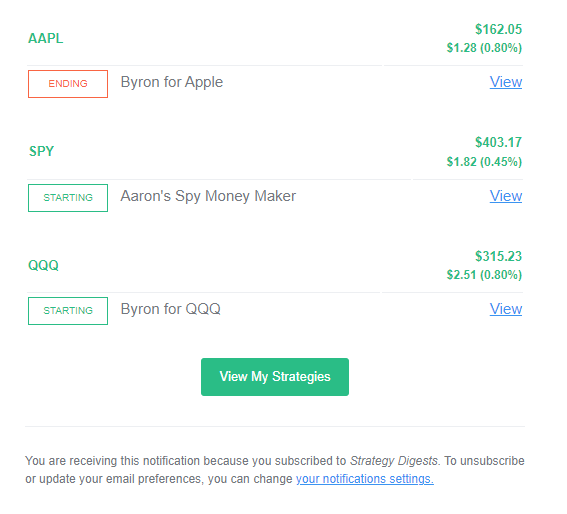
Let us assume all three are long strategies that you previously evaluated and decided to use in your trading plan.
A simple way to read that email:
From there, click View next to any strategy you care about. That opens Wallstreet.io in a new tab with the strategy already loaded so you can check the chart, confirm the signal, and look at recent stats before you touch your broker account.
This extra review step is your confirmation layer. The alert tells you what the rules are doing. Your routine decides whether you act on it.
If you are ever unsure what Starting, Active, Ending or Inactive mean, see How Strategy Alerts Work.
Review Starting strategies on the chart
For each Starting alert you want to consider:
Then ask yourself:
If everything lines up and the strategy fits your plan, you might choose to mirror the new trade with your broker. If not, you can mark it as “watch only” or skip it.
Use the View Stats Panel any time you want to double-check recent performance or typical behavior before deciding.
Manage Active and Ending strategies
After you handle new Starting signals, look at your Active and Ending strategies.
For Active strategies:
For Ending strategies:
Some traders choose to close or reduce positions near the close when a strategy is Ending. Others scale out more gradually or keep part of the trade if it still fits their wider thesis. The important part is that you make a conscious decision instead of letting Ending alerts pile up unread.
Do a weekly maintenance review
Once a week, take a few minutes to tidy up your strategy workflow.
From the Subscriptions view:
This light maintenance keeps your alert stream aligned with your current trading focus instead of your past curiosity.
Keep your routine simple and repeatable
The most effective routine is one you can follow even on busy days. A simple pattern could look like this:
You can always add more nuance over time, but starting with a straightforward rhythm will help you actually use the tools instead of feeling buried by them.
Pair this guide with: