How Strategy Alerts Work
What this helps you do
This guide explains how strategy alerts are generated for Pre-Built Strategies, what each alert state means, and how those alerts relate to the historical backtests you see in the platform. It matters because once you know how alerts behave, you can respond to them with confidence instead of guessing what a “Starting” or “Ending” signal is telling you.
What strategy alerts are
Strategy alerts are notifications that tell you when a strategy’s rules have moved into an important state.
They only apply to strategies you subscribe to. Subscribing tells the platform to:
Alerts show up both inside Wallstreet.io and by email, depending on your notification settings. They are meant to work as prompts that say “this strategy’s rules just turned on” or “this strategy’s rules just turned off,” not as blanket instructions to trade.
How and when alerts are calculated
Every subscribed strategy is evaluated once per trading day using the daily closing price for its timeframe.
The process looks like this: During the session, the market trades normally. At the end of the day, after the close, Wallstreet.io applies the strategy’s entry and exit rules to that day’s data.
Based on those rules, the strategy is classified into one of four possible states:
This same end-of-day logic is used in the backtests you see in the View Stats Panel. That is why the alerts and the historical results line up so closely.
What each alert state means
Alerts are tied to meaningful changes in the strategy’s state.
Starting
Traders often review the chart around the close to decide whether they want to take a trade that mirrors the strategy’s new position.
Active
Active does not typically generate fresh alerts each day. It is a “still in the trade” state that you can see in the Strategies table and View Stats Panel.
Ending
Many traders use Ending alerts as a prompt to reduce, close, or re-evaluate their own positions that were based on the strategy.
Inactive
Inactive is the “nothing to do right now” state.
If you want to understand the rule logic behind these alerts
Strategy alerts are entirely driven by the entry and exit conditions defined inside each strategy.
If you’re the kind of trader who likes to see how those conditions are structured or how the system interprets them, you can review the Strategy Logic Guide under the Strategy Builder section. It explains how rules are evaluated at the close and how those evaluations translate into the Starting, Active, Ending, and Inactive states you see in your alerts.
This is optional, but helpful if you like to understand the mechanics behind the signals you receive.
Where you see strategy alerts
After you subscribe to a strategy, you can expect alerts to appear in two places:
Email notifications summarize which of your subscribed strategies are Starting, Active, or Ending for that session so you do not have to log in and check each one manually.
If you unsubscribe from a strategy, it is removed from your Subscriptions list and its alerts stop.
How alerts relate to backtests and live trades
Because alerts are based on end-of-day data, they are designed to match the same logic used in the historical backtests:
This alignment keeps the live signals as close as possible to the behavior you see in the View Stats Panel and on the chart with Trade Highlights.
It is still important to:
Alerts are there to highlight when a strategy’s rules are active, not to replace your judgment.
Avoid overloading your alert stream
Wallstreet.io gives you the freedom to subscribe to as many strategies and symbols as you like. That flexibility is helpful when you are exploring ideas, but it can also create a problem if you turn on alerts for everything without a clear plan.
When you subscribe to dozens of strategies across many tickers, your Strategy Notification emails can become hard to read. You might see several strategies on the same stock with different names, directions, and rules, all firing at once. If those strategies are still using their default names, it becomes even harder to tell which signal belongs to which idea.
A cleaner approach is to:
The goal is to keep your alert stream focused enough that, when an email arrives, you can look at it and quickly say, “I know exactly which strategies these are, and I know what to do next.”
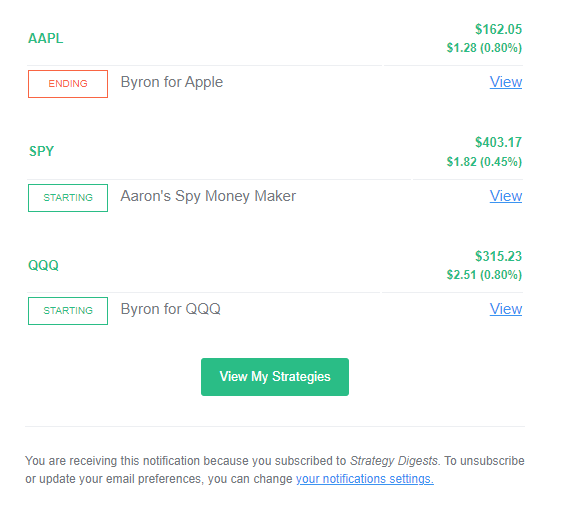
Example: Focused Strategy Notification
In this example, the trader is subscribed to a small set of clearly named strategies on a few symbols. Each row is easy to read. You can immediately tell which stock the alert is for, which strategy generated it, and whether it is Starting or Ending. This kind of email is actionable at a glance.
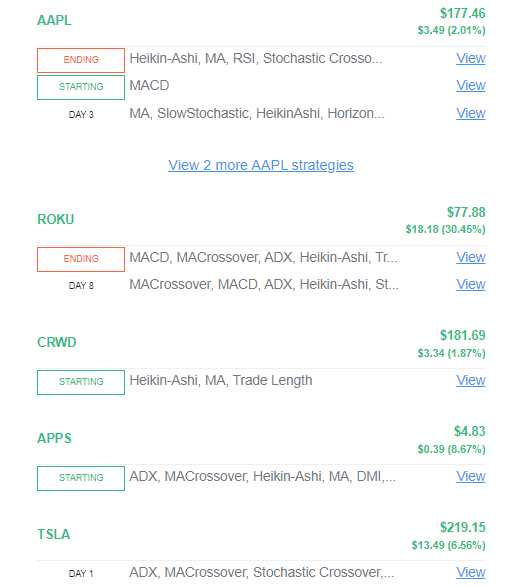
Example: Overloaded Strategy Notification
Here, the trader has turned on alerts for many strategies on many symbols, most of them still using their default names. Several strategies fire on the same stock with different conditions and day counts. The email is technically accurate, but it is difficult to interpret and easy to ignore because there is no clear focus.
What to do next
If you are comfortable with how alerts work:
If you want to tighten your process even more, you can pair this guide with: